CRM / RevOps Support Portfolio

I help teams build cleaner CRM workflows, stronger reporting habits, and more reliable lead handoffs.

Practical CRM support, workflow cleanup, documentation, reporting, and user troubleshooting built from real application support experience.

8,000+ UsersSupported across LMS and applications
50% FasterTicket turnaround through improved triage
Cleaner HandoffsClearer ownership and follow-up
Reliable ReportingKPI standards, dashboards, and tracking
HUBSPOT CRM

CRM Operations Projects

Lead segmentation, outreach workflows, and CRM governance built to improve targeting, execution, and reporting consistency.

HUBSPOT SERVICE HUB

Support Operations Projects

Ticket resolution, knowledge management, SLA workflows, and support reporting built to demonstrate practical customer support operations.

HubSpot Service Hub

Ticket Resolution Project

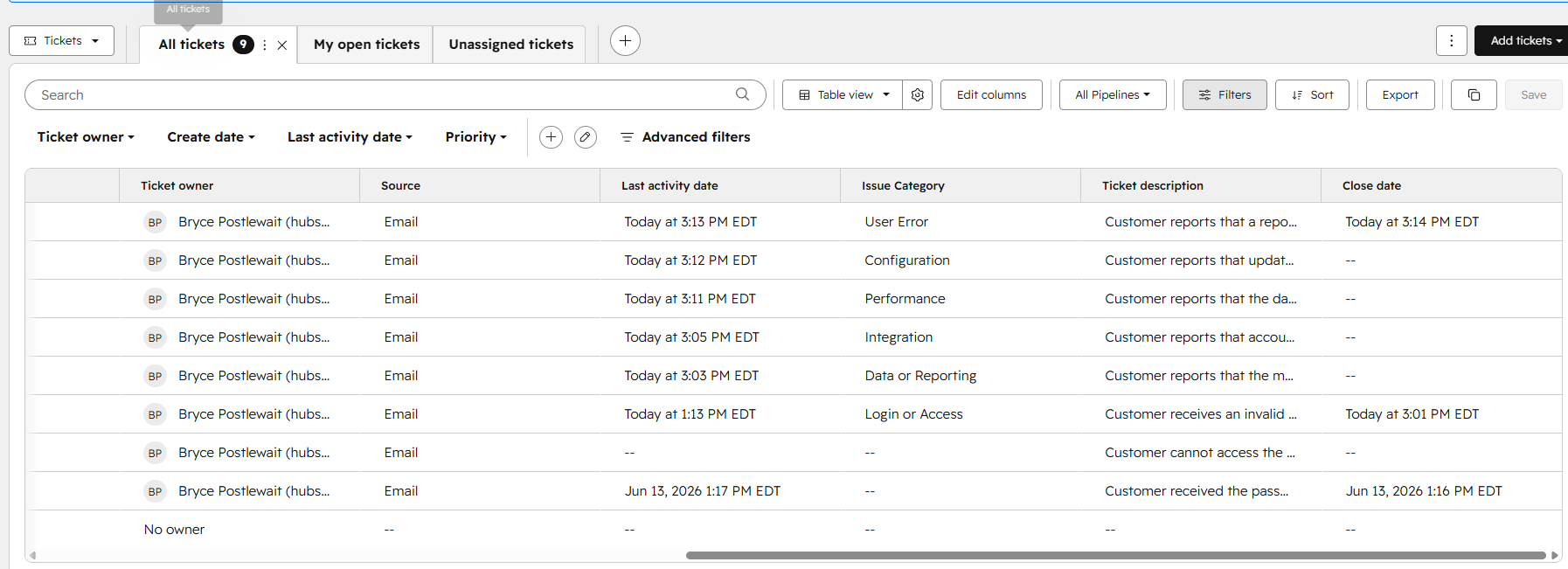
Ticket intake, troubleshooting, customer communication, and documented closure
Problem

A customer could not access their account after completing a password reset.

Solution

Documented the issue, investigated the login method, contacted the customer, and identified the incorrect login path.

Outcome

Customer access was restored through the correct SSO portal, with the root cause and resolution recorded.

Skills Ticketing • Troubleshooting • Customer Communication
HubSpot Service Hub

Knowledge Base Project

Structured support documentation designed for clarity, searchability, and self-service
Problem

Users needed a clear self-service resource for resolving a recurring support issue.

Solution

Created a structured knowledge base article with clear headings, ordered steps, troubleshooting guidance, and searchable categorization.

Outcome

Produced a reusable support resource that helps users find answers independently and reduces repetitive support requests.

Skills Knowledge Management • Technical Writing • Self-Service
HubSpot Service Hub

SLA + Support Dashboard Project

Priority-based queues, escalation logic, and support performance visibility
Problem

Support teams needed clearer visibility into response times, overdue tickets, priority, and issue trends.

Solution

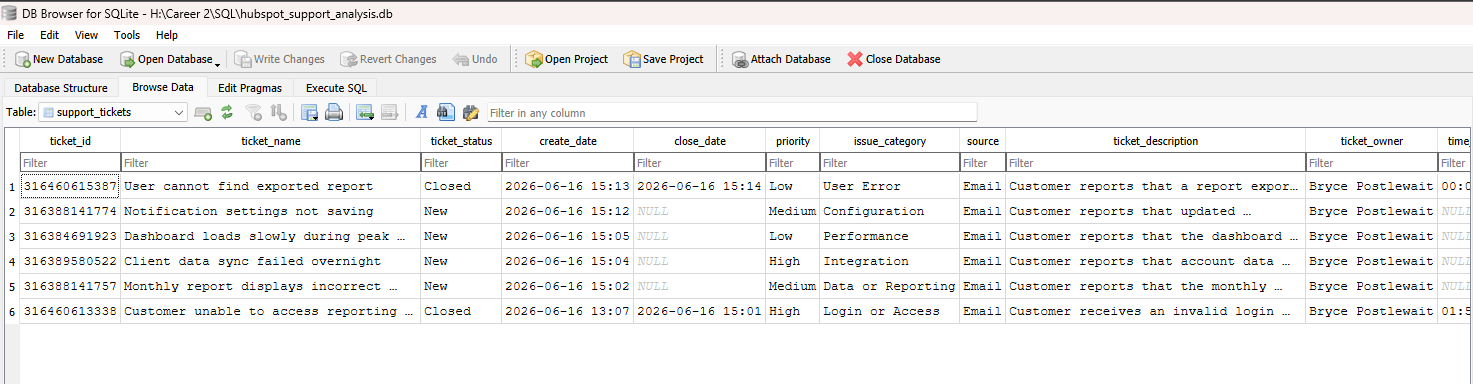
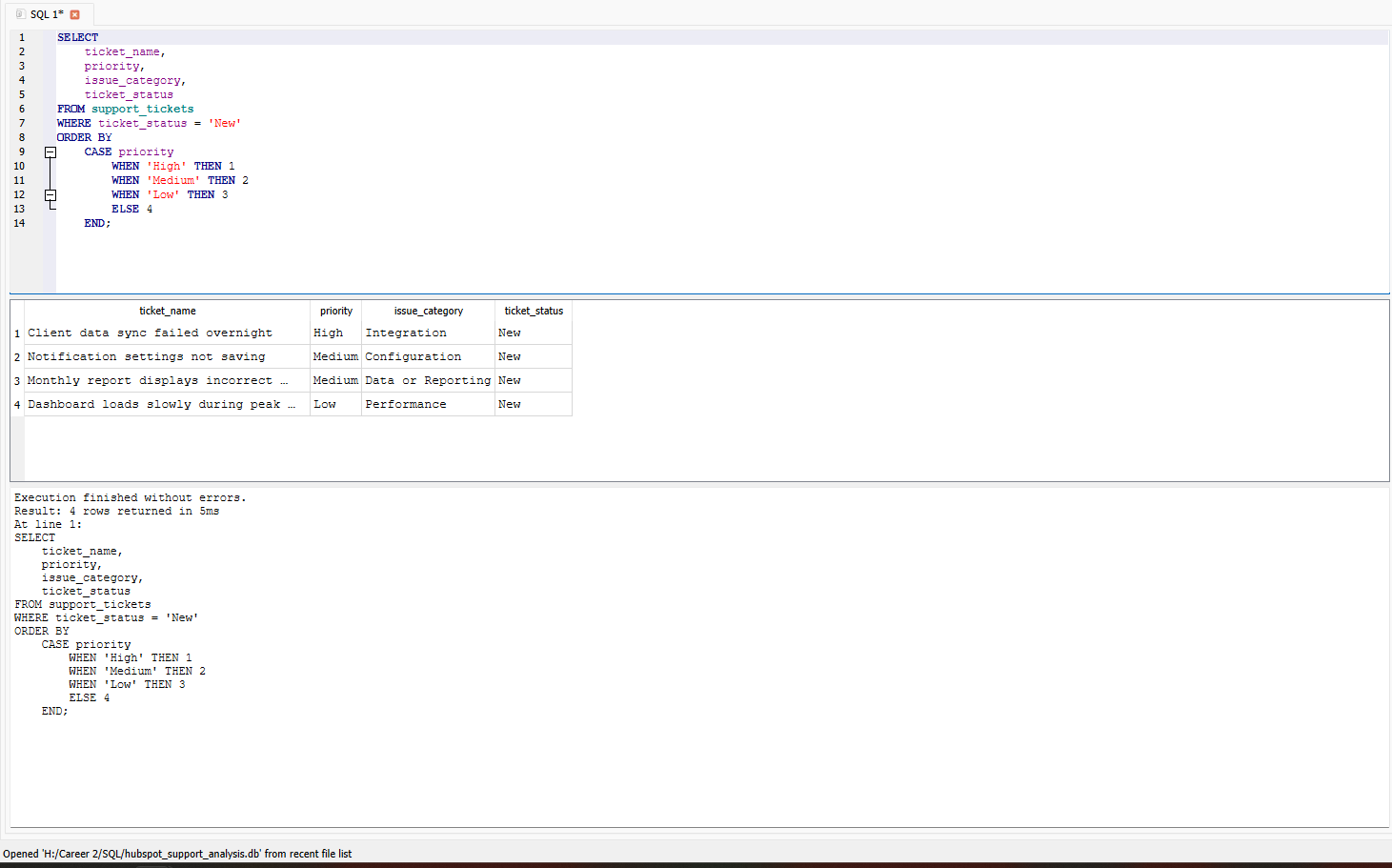
Built a priority-based ticket queue, configured SLA and escalation properties, and created support reporting views.

Outcome

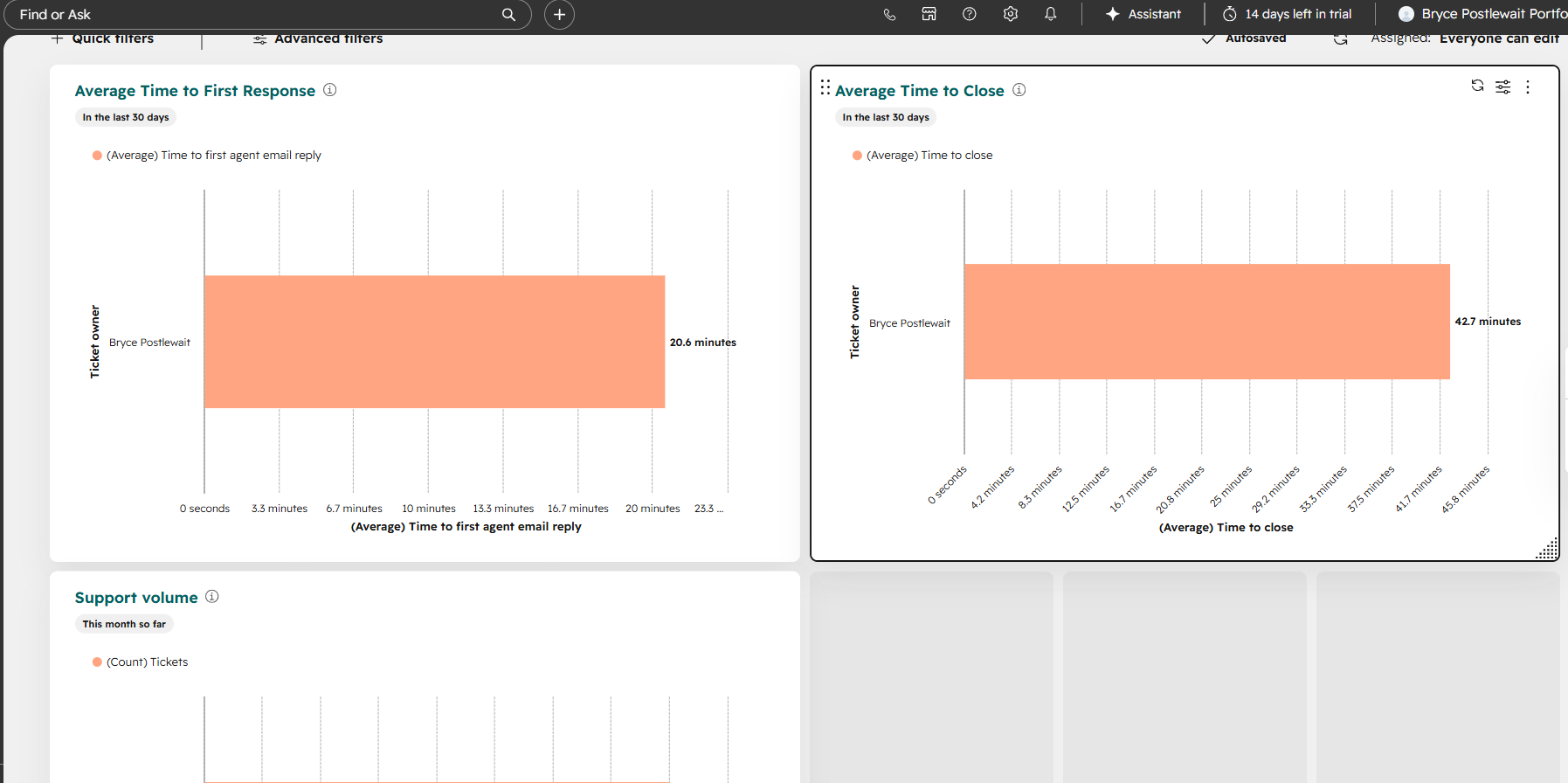
Improved visibility into response performance, resolution time, overdue work, and recurring support issues.

Skills SLA Management • Escalation Logic • Support Reporting
Contact Bryce

I'm Looking for My Next Role — Let's Connect

Professional Feedback
Back to projects
HubSpot CRM

Outbound Segmentation + Suppression

Targeting, exclusions, and lifecycle hygiene designed to improve outreach accuracy and reporting consistency.

Governed AudienceEligible contacts defined through shared rules
Master SuppressionCustomers excluded from outbound activity
Cleaner ReportingAttempts, connects, and meetings standardized

Goal and success metrics

Build a governed outbound segmentation system for community banks and credit unions that prevents accidental outreach to suppressed records and keeps KPI reporting consistent.

Targeting accuracySegmented views
Suppression coverageMaster DNC
Follow-up hygieneStatus + last touch
Reporting consistencyKPI definitions

Workflow logic summary

  1. 1
    Define the outbound pool

    Eligible contacts require a known email address, outbound eligibility, and a lifecycle stage other than Customer.

  2. 2
    Create targeted segments

    Persona and institution-type views separate community-bank and credit-union contacts for more relevant outreach.

  3. 3
    Apply master suppression

    A shared Do Not Contact rule excludes customers from the outbound pool and all related targeting views.

  4. 4
    Connect execution to reporting

    Outbound status and last outbound touch properties feed follow-up queues and attempted, connected, and meeting-set KPI views.

Data model and hygiene

  • Required fields: Persona, institution type, outbound eligible, lifecycle stage, outbound status, and last outbound touch
  • Suppression rule: Lifecycle stage Customer is excluded from the outbound pool and targeting segments
  • Status definitions: Not Started, Attempted Outreach, Connected, Meeting Set, Nurture, and Disqualified
  • Naming conventions: OUT | Pool | …, OUT | Persona | …, OUT | Institution | …, and SUP | Master | …

Tools demonstrated

HubSpot ContactsCustom PropertiesAdvanced FiltersLifecycle StagesSuppression RulesCRM Views

CRM system screenshots

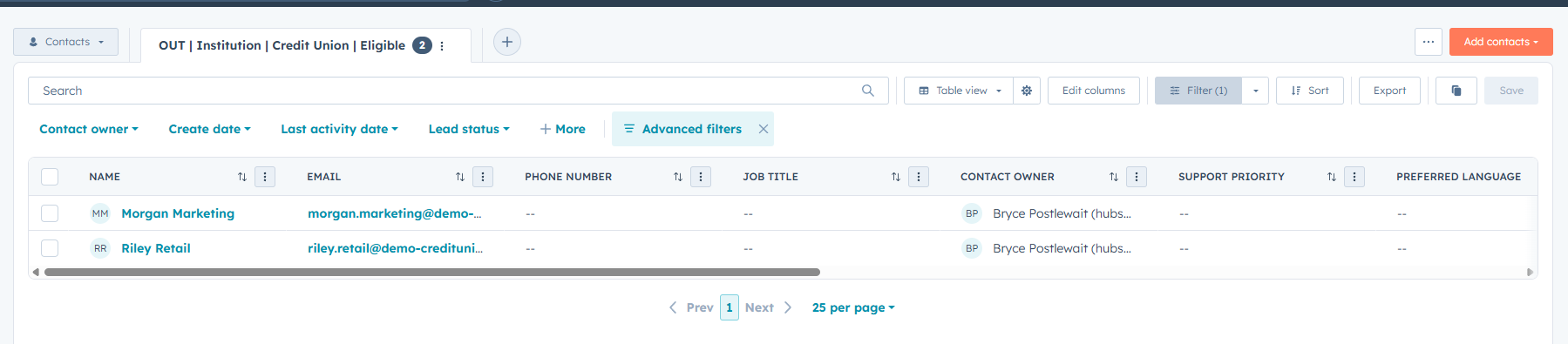
The three screenshots show the governed outbound pool, master suppression logic, and a targeted credit-union segment.
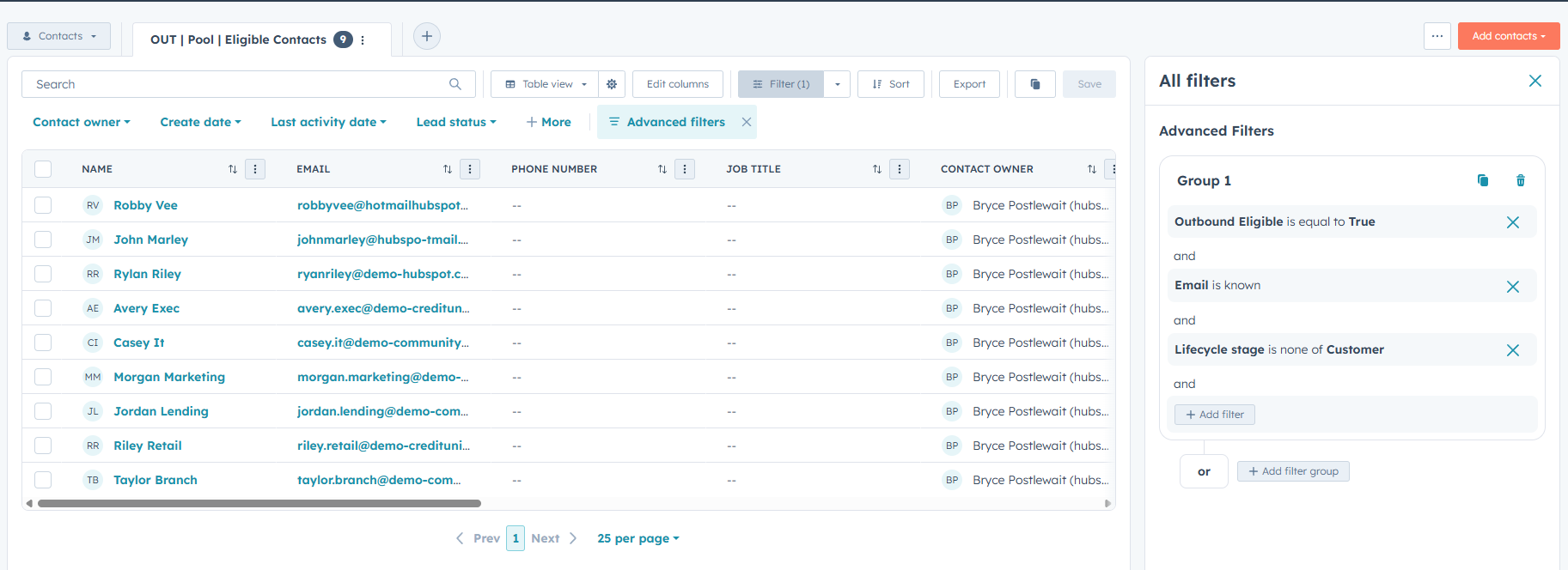
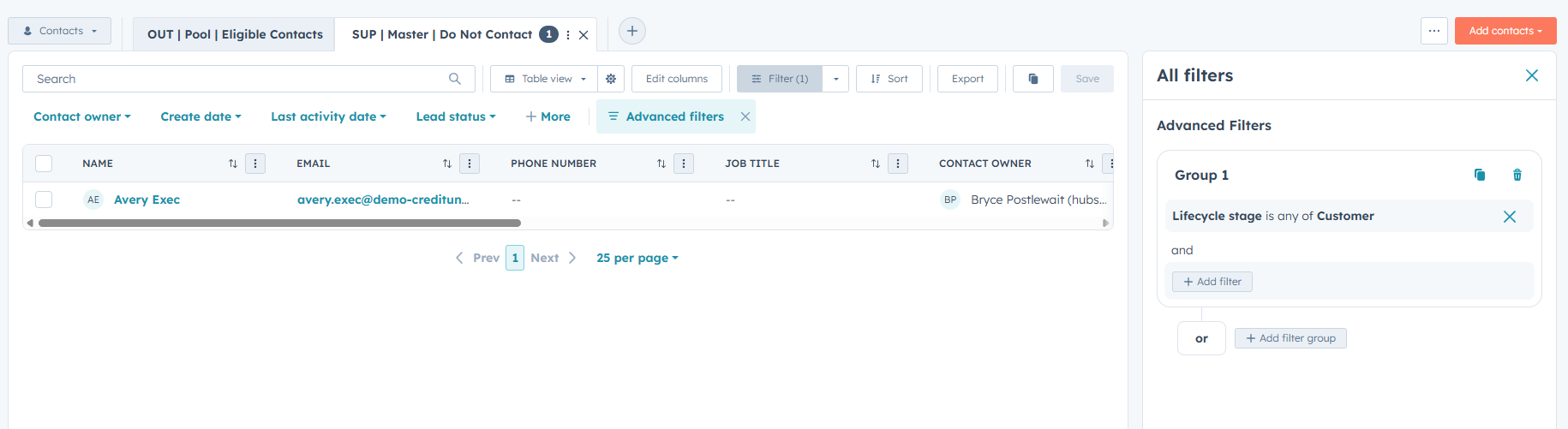
Outbound pool showing eligible contacts
Outbound Pool: Eligible Contacts
Master suppression Do Not Contact view
Master Suppression: Do Not Contact
Credit union eligible target segment
Target Segment: Credit Union Eligible

Reporting structure

Rep view

Persona and institution segments with follow-up-needed and overdue queues

Manager view

Attempts, connects, meetings set, and weekly activity snapshots

Definitions

Shared KPI definitions for attempted, connected, and meeting-set outcomes

Project outcome

TargetingStandardized

Reusable outbound pool plus persona and institution segments

SuppressionEnforced

Customers excluded through shared master DNC logic

Reporting hygieneImproved

Status and date properties support consistent follow-up and KPI views

Portfolio note: This is a simulated HubSpot sandbox project created to demonstrate CRM segmentation, suppression governance, lifecycle hygiene, and reporting logic.
Back to projects
HubSpot CRM

Outreach Messaging + Follow Up Workflow

Templates, snippets, and follow-up queues connected to targeted segments for more consistent outreach execution.

Reusable MessagingTwo banking email templates
Call SupportTwo reusable call snippets
Follow-Up CoverageNeeded and overdue queues

Goal and success metrics

Create a reusable outbound messaging kit and a consistent follow-up workflow that connects directly to segmentation, improves activity logging consistency, and supports clean reporting for a banking BDR motion.

Template reuseStandardized
Follow-up coverageQueues built
Logging hygieneStatus + dates
Next-step clarityRepeatable

Workflow logic summary

  1. 1
    Segment first

    Start from eligible persona or institution views to select the appropriate outreach audience.

  2. 2
    Send consistent messaging

    Use banking-specific email templates for the initial message and no-response follow-up.

  3. 3
    Log the action

    Update Outbound Status and Last Outbound Touch to document progress and maintain consistent reporting.

  4. 4
    Work the queue

    Use Follow Up Needed and Overdue views to prevent prospects from falling through the cracks.

Data model and hygiene

  • Templates: Banking introduction template and no-response follow-up template
  • Snippets: Call opener and 15-minute meeting request
  • Required fields: Outbound Status and Last Outbound Touch to support follow-up queues
  • Rules of use: Status updated on every touch and Last Outbound Touch updated to reflect recency

Tools demonstrated

HubSpot TemplatesSnippetsContact PropertiesAdvanced FiltersFollow-Up ViewsActivity Tracking

CRM system screenshots

The three screenshots show the reusable email templates, call snippets, and overdue follow-up queue used in the workflow.

HubSpot email templates list
Email Templates List
Banking call opener and meeting request snippets
Call Opener + Meeting Ask Snippets
Follow-up overdue queue using outbound status and last touch
Follow-Up Queue: Overdue Contacts

Reporting structure

Rep view

Follow Up Needed, Overdue, and next-action segments organized by persona and institution type

Manager view

Outcome distribution by attempted, connected, and meeting-set status to monitor pipeline health

Definitions

Shared definitions for attempted, connected, and meeting-set outcomes

Project outcome

Messaging consistencyStandardized

Reusable templates and snippets aligned to banking personas

Follow-up hygieneOperationalized

Queues use status and last touch to reduce missed follow-ups

Reporting readinessImproved

Consistent field updates support KPI views and activity summaries

Portfolio note: This is a simulated HubSpot sandbox project created to demonstrate outbound messaging, follow-up workflow design, activity hygiene, and reporting readiness.
Back to projects
HubSpot CRM

KPI Dashboard Pack

Attempts, connects, meetings set, and weekly activity tracked through governed definitions and consistent date properties.

Governed KPI ViewsAttempted, connected, and meetings
Date HygieneLast touch and meeting dates
Manager VisibilityWeekly activity snapshot

Goal and success metrics

Create a lightweight KPI reporting pack inside HubSpot that standardizes what counts as outreach progress and produces consistent weekly snapshots for rep and manager visibility.

KPI consistencyDefined
Weekly activityTracked
Meeting set KPIDated
Follow-up coverageVisible

Workflow logic summary

  1. 1
    Standardize outcomes

    Use Outbound Status to define attempted outreach, connected, meeting set, nurture, and disqualified.

  2. 2
    Timestamp results

    Use Last Outbound Touch for recency and Meeting Set Date for meeting KPI tracking.

  3. 3
    Build rep KPI views

    Views show current pipeline activity by attempted outreach, connected contacts, and meetings set.

  4. 4
    Create the manager snapshot

    The Weekly Activity view aggregates outreach momentum and supports basic performance monitoring.

Data model and hygiene

  • Properties: Outbound Status, Last Outbound Touch, and Meeting Set Date
  • KPI definitions: Attempted, connected, and meeting set are defined and used consistently across views
  • Suppression aware: KPI views exclude customers to prevent inflated outreach counts
  • Repeatable filters: Eligible contacts combined with consistent date windows such as today and this week

Tools demonstrated

HubSpot PropertiesAdvanced FiltersCRM ViewsKPI DefinitionsDate PropertiesActivity Reporting

CRM system screenshots

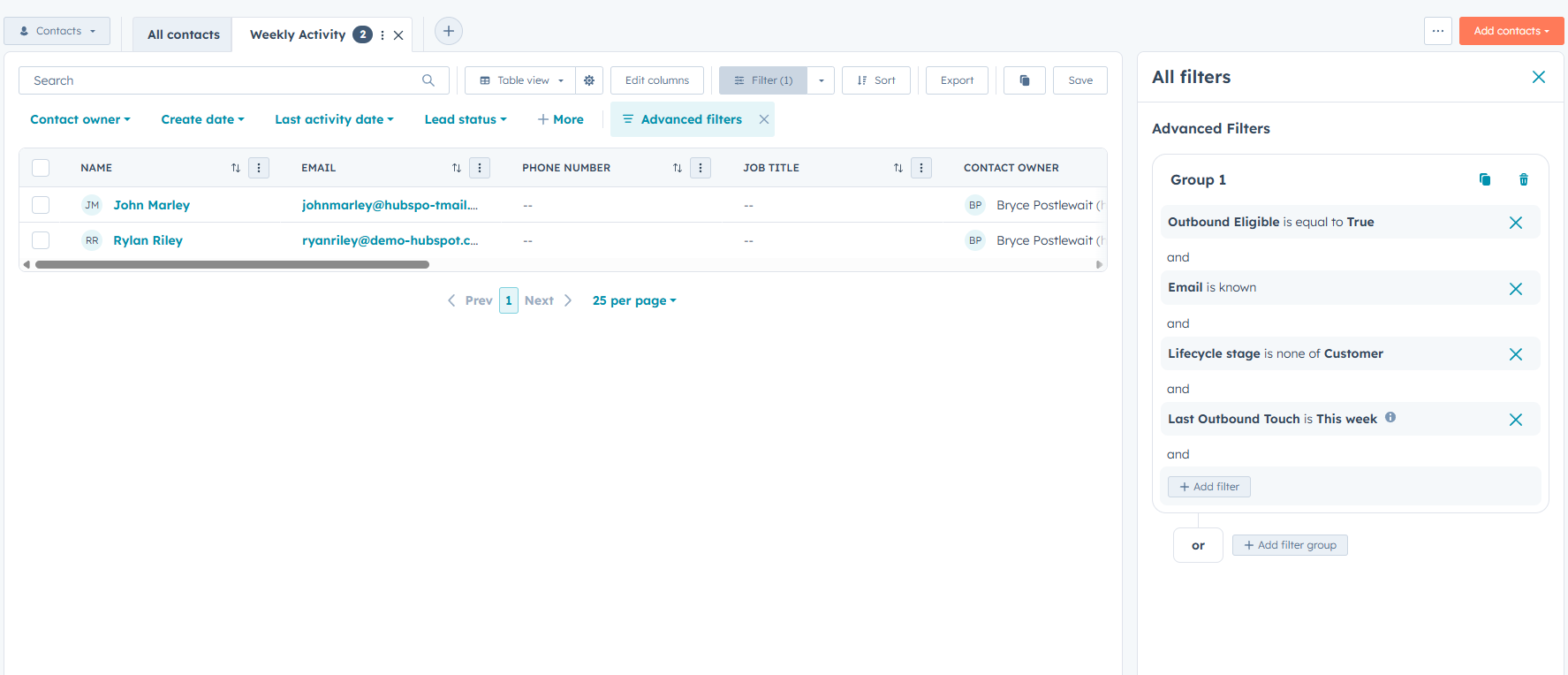
The three screenshots show the meeting-set KPI view, connected-contact view, and weekly manager activity snapshot.
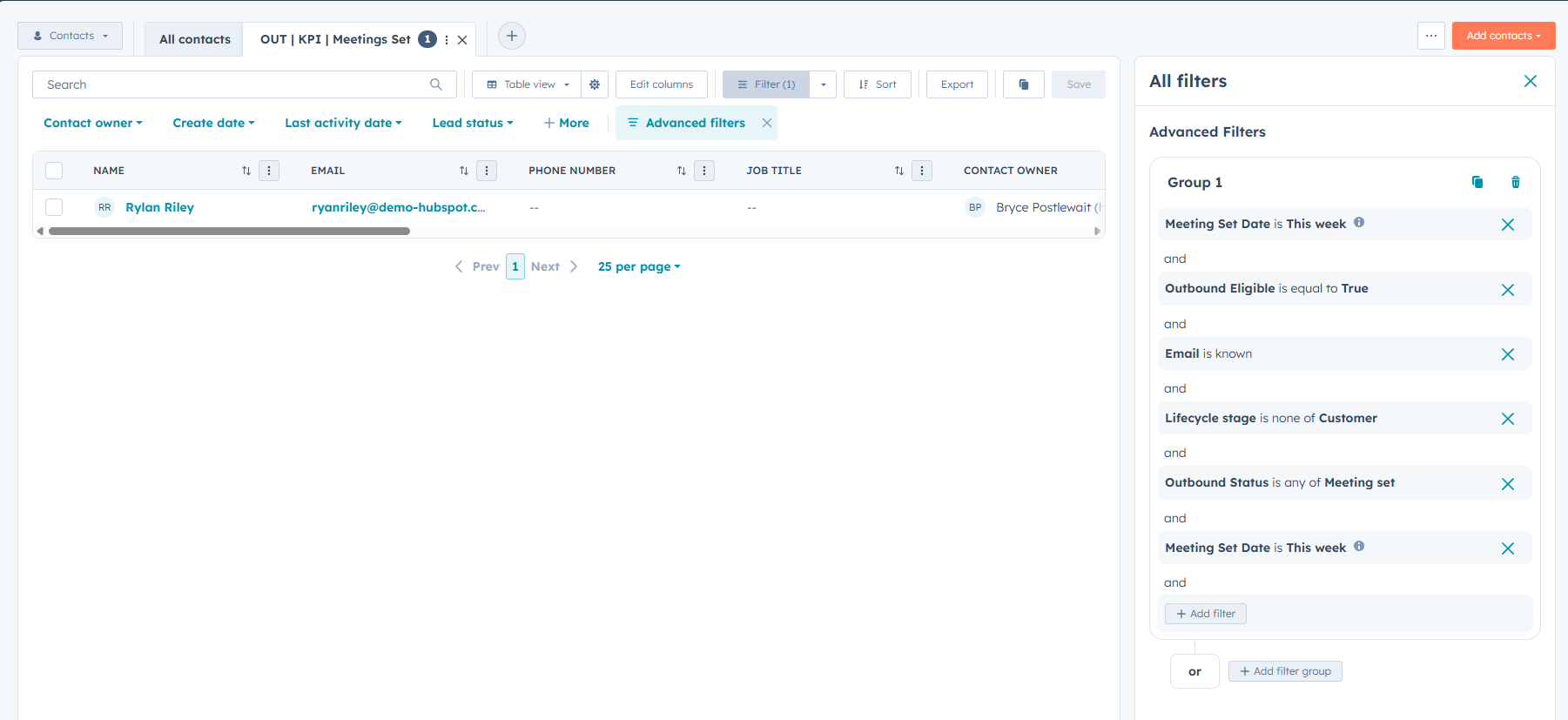
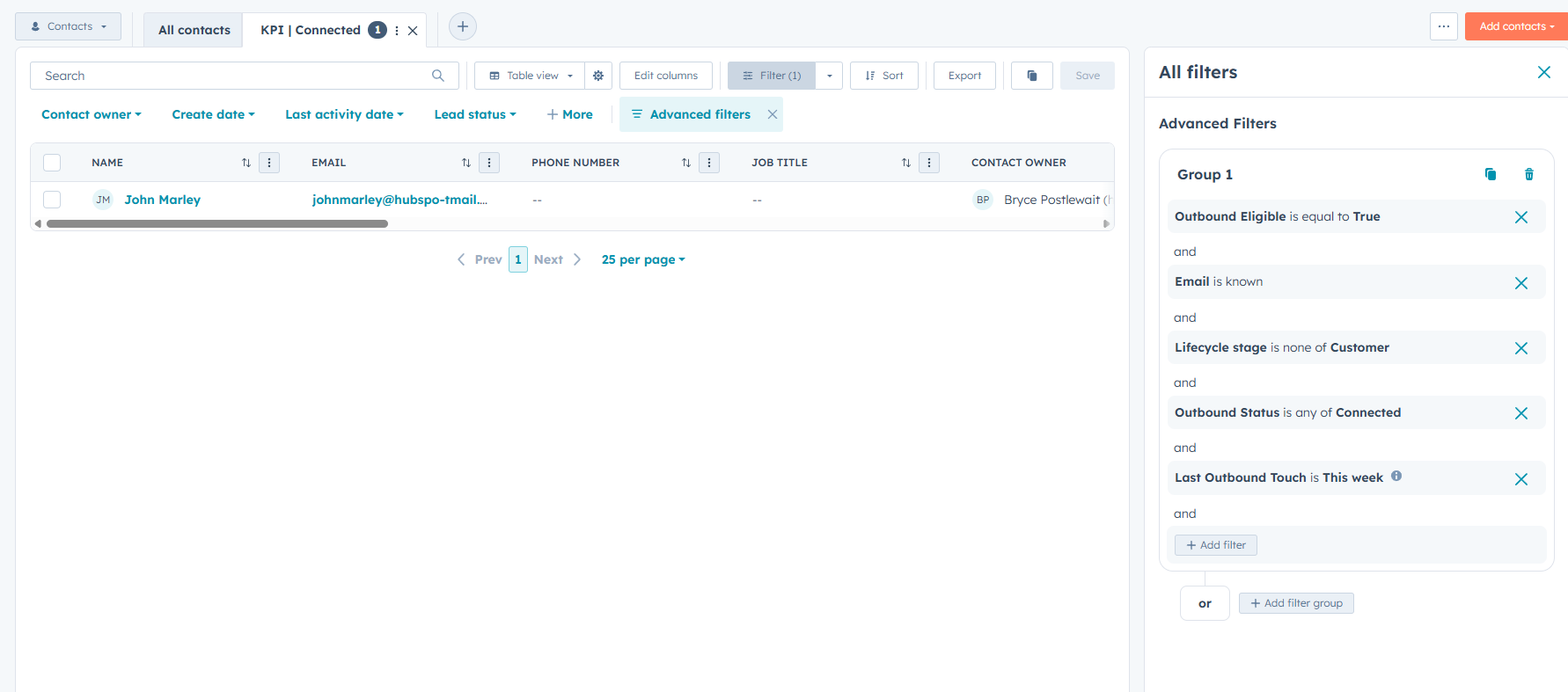
Meeting set KPI view with Meeting Set Date
Meetings Set KPI View
Connected contacts KPI view
Connected Contacts KPI View
Weekly activity manager snapshot
Weekly Activity Manager Snapshot

Reporting structure

Rep KPIs

Attempted outreach, connected, meetings set, and disqualified contact views

Manager view

Weekly activity snapshot using Outbound Status and Last Outbound Touch

Definitions

KPI definitions and SLA rules used to keep reporting consistent

Project outcome

Reporting consistencyStandardized

Aligned definitions for attempted, connected, and meeting-set outcomes

Meeting KPIOperational

Meeting Set Date supports week-based KPI tracking

Manager visibilityImproved

Weekly Activity provides a quick pipeline-health snapshot

Portfolio note: This is a simulated HubSpot sandbox project created to demonstrate KPI standardization, activity hygiene, reporting views, and manager visibility.
Back to projects
HubSpot Service Hub

Ticket Resolution Project

A complete support workflow showing ticket intake, troubleshooting, customer communication, and documented resolution.

Structured IntakePriority, ownership, and issue details
Documented SupportNotes and customer communication
Closed LoopRoot cause and resolution recorded

Goal and support scenario

Create a realistic HubSpot support ticket demonstrating how an account-access issue can be documented, investigated, communicated, and resolved within a single customer record.

Issue typeAccount access
PriorityHigh
SourceEmail
Final statusClosed

Resolution workflow

  1. 1
    Document the issue

    Created the ticket with a clear description, customer association, ticket owner, source, priority, and initial status.

  2. 2
    Investigate the cause

    Confirmed the password reset email was delivered and identified the login method as the likely source of the problem.

  3. 3
    Communicate with the customer

    Sent a follow-up email asking whether the customer was using the organization’s SSO portal or the standard direct login page.

  4. 4
    Resolve and close

    Provided the correct SSO login path, documented successful access, recorded the root cause, and closed the ticket.

Ticket data and documentation

  • Core properties: Ticket name, pipeline, status, description, source, owner, priority, and create date
  • Internal documentation: Troubleshooting observations, customer findings, root cause, and final resolution
  • Customer communication: A logged email requesting the information needed to isolate the problem
  • Resolution record: Closed status with a final note confirming restored access and no further action required

Tools demonstrated

HubSpot TicketsTicket PropertiesActivity TimelineInternal NotesCustomer EmailTicket Closure

Support system screenshots

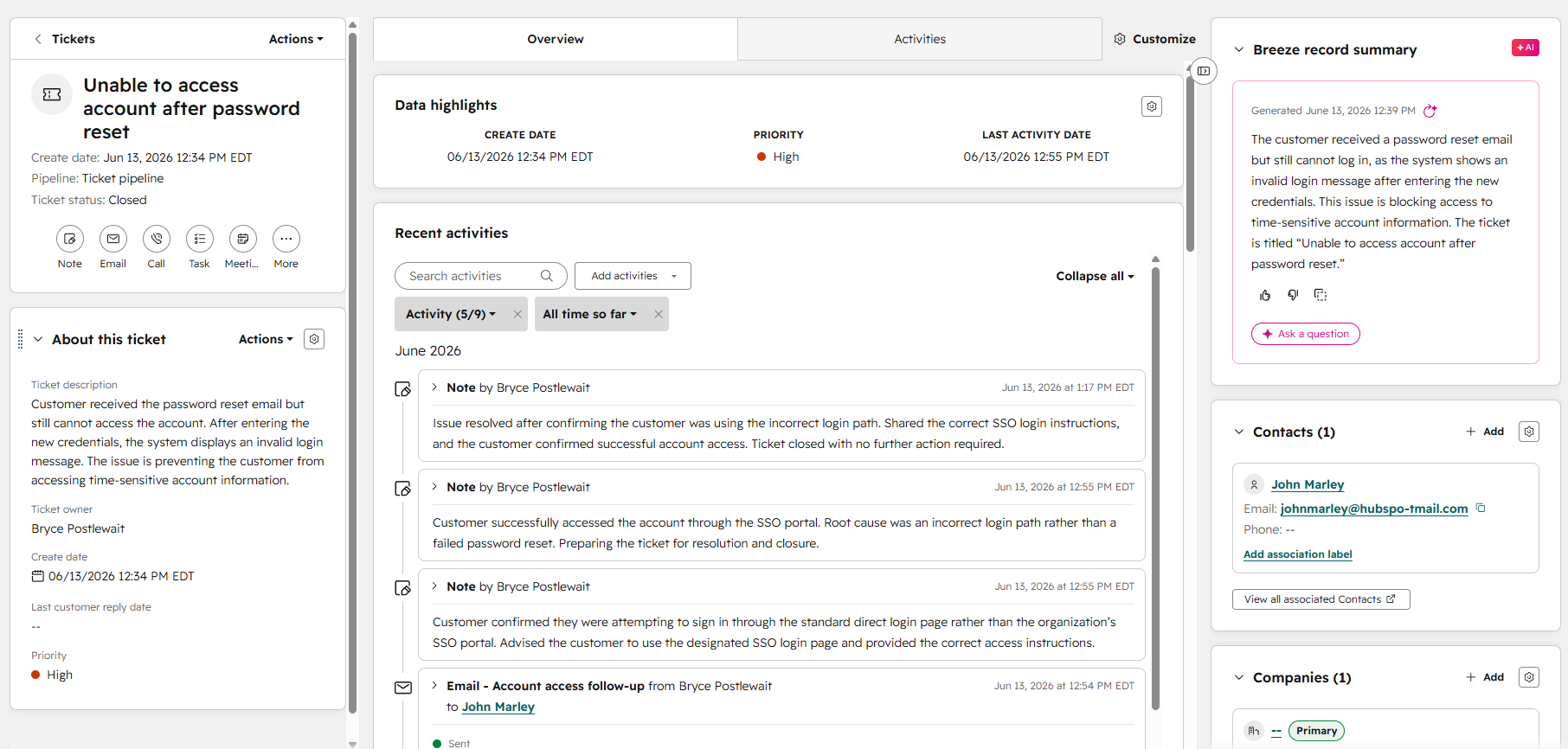
The three screenshots show the ticket progressing from structured intake through troubleshooting and final closure.
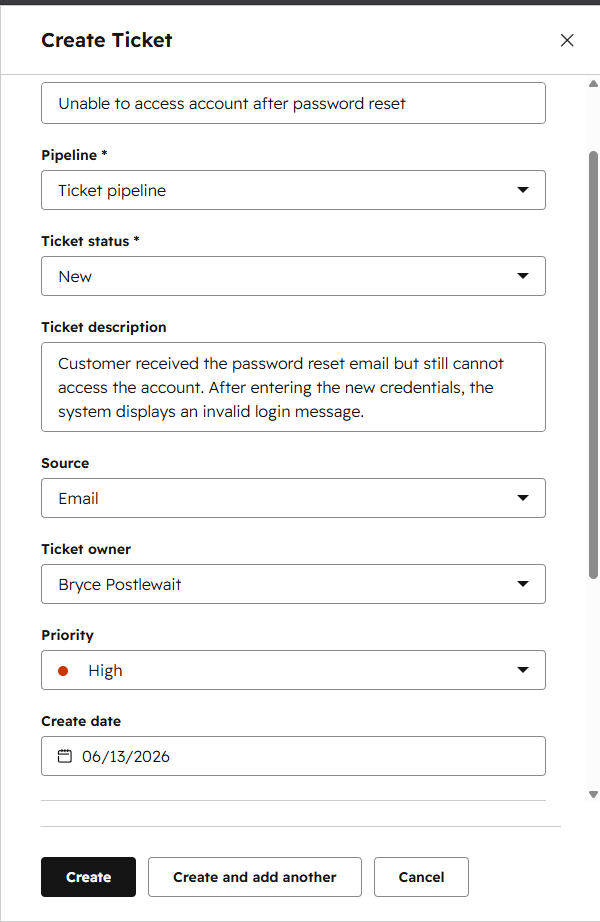
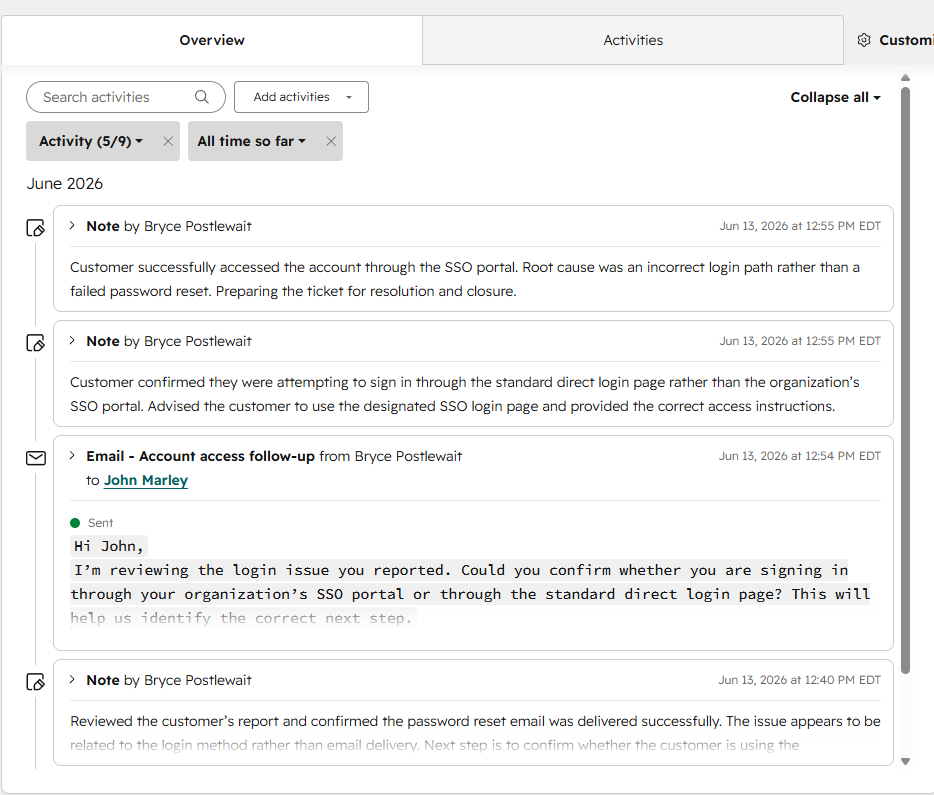
Ticket details and priority screenshot placeholder
Ticket Details and Priority
Troubleshooting and communication activity screenshot placeholder
Troubleshooting and Communication Activity
Resolved ticket and closure summary screenshot placeholder
Resolved Ticket and Closure Summary

Support record created

Intake

Issue description, customer association, owner, source, priority, and ticket status

Activity

Internal troubleshooting notes and a customer-facing follow-up email

Resolution

Confirmed root cause, successful customer access, and documented ticket closure

Project outcome

Ticket historyComplete

The full support process is visible within one customer record.

Root causeDocumented

The issue was traced to the customer using the incorrect login path.

Customer outcomeAccess restored

The customer successfully signed in through the correct SSO portal.

Portfolio note: This is a simulated support scenario created in a HubSpot sandbox to demonstrate ticket-management and customer-support workflow skills.
Back to projects
HubSpot Service Hub

Knowledge Base Project

Structured support documentation designed for clarity, searchability, and customer self-service.

Structured ArticleClear headings, steps, and guidance
Searchable ContentOrganized for faster discovery
Self-Service SupportReusable help for recurring issues

Goal and support scenario

Create a clear self-service knowledge base resource for a recurring account-access issue so customers can locate the correct login instructions, understand common causes, and complete basic troubleshooting before contacting support.

Article typeHow-to guide
Primary audienceEnd users
Issue categoryAccount access
Support modelSelf-service

Documentation workflow

  1. 1
    Identify the recurring issue

    Selected an account-access problem that customers may be able to resolve without direct agent assistance.

  2. 2
    Structure the article

    Organized the content with a clear title, short introduction, ordered instructions, troubleshooting notes, and next steps.

  3. 3
    Improve readability

    Used concise headings, short paragraphs, numbered actions, and plain-language explanations designed for quick scanning.

  4. 4
    Support content discovery

    Assigned the article to a relevant category and used searchable wording that matches how customers describe the issue.

Article structure and governance

  • Article title: Uses customer-facing language that clearly describes the issue being solved
  • Content structure: Introduction, prerequisites, ordered steps, troubleshooting notes, and escalation guidance
  • Searchability: Uses relevant account-access, password-reset, login, and SSO terminology
  • Maintenance: Designed so support teams can update instructions when login procedures or system behavior changes

Tools demonstrated

HubSpot Knowledge BaseArticle EditorContent StructureTechnical WritingCategoriesSearch Optimization

Knowledge base screenshots

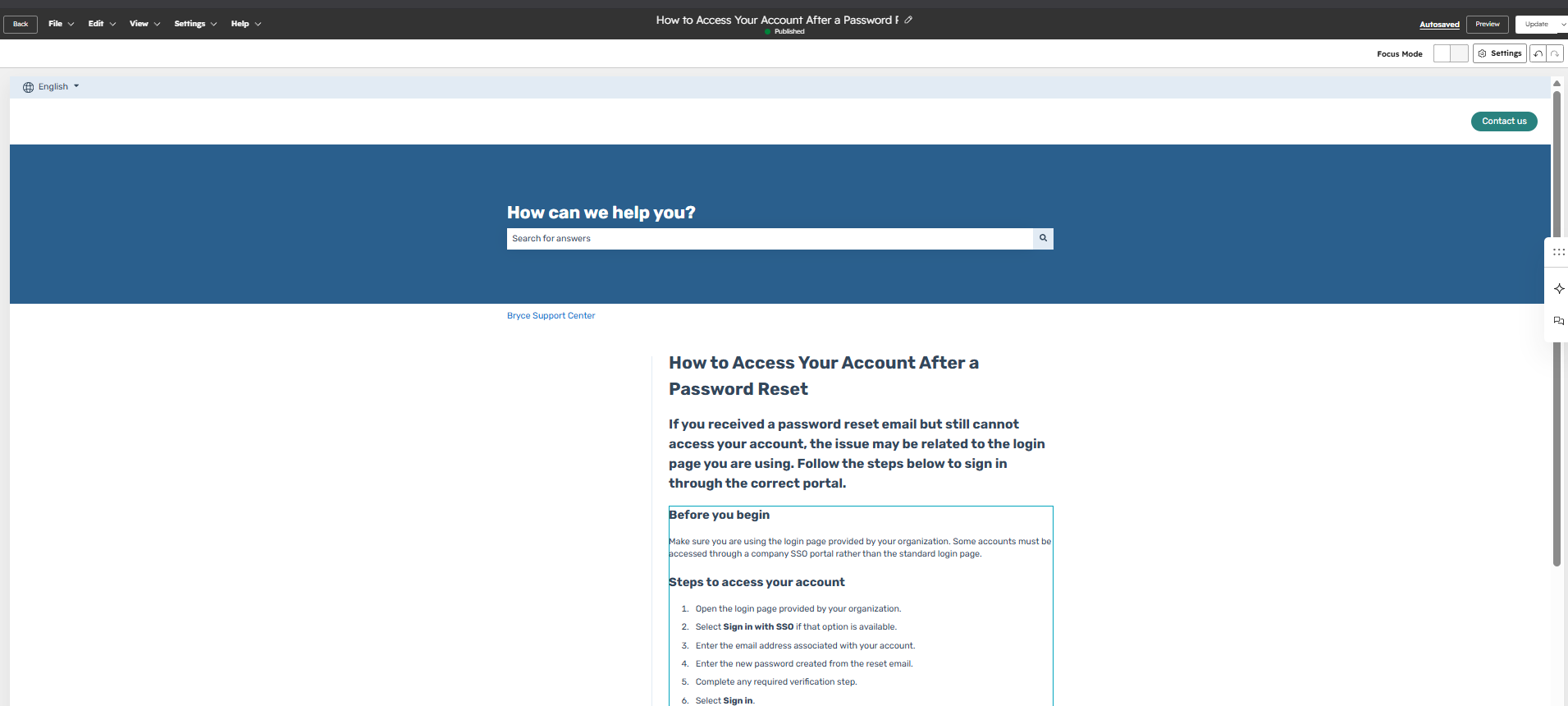
The three screenshots show the published article, the structured article editor, and the category or search experience customers would use to locate the resource.
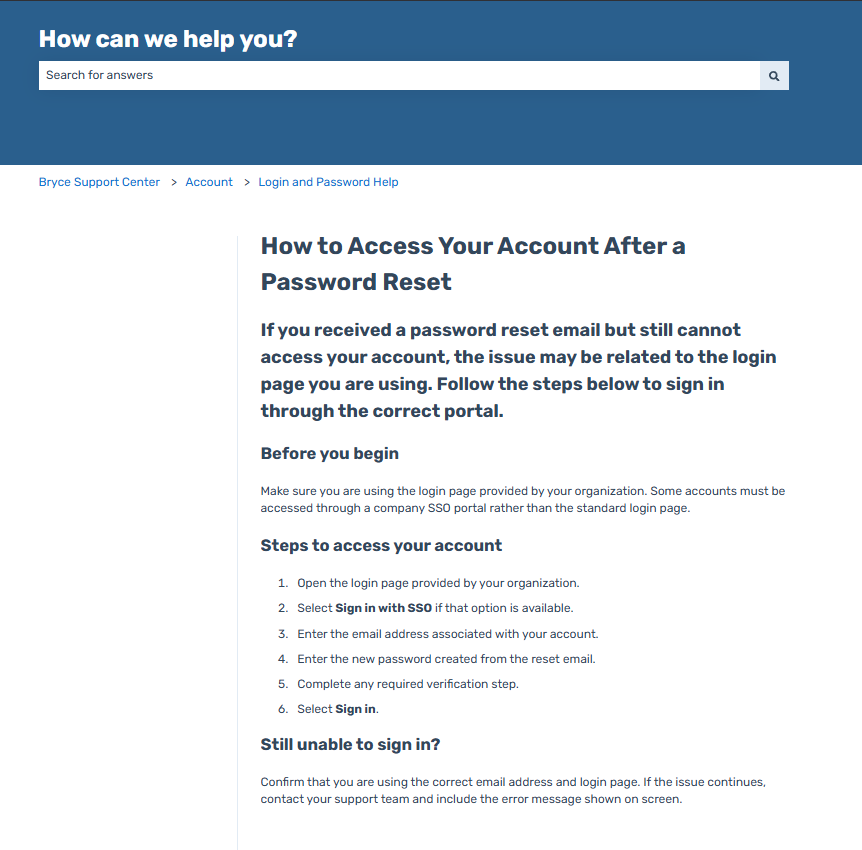
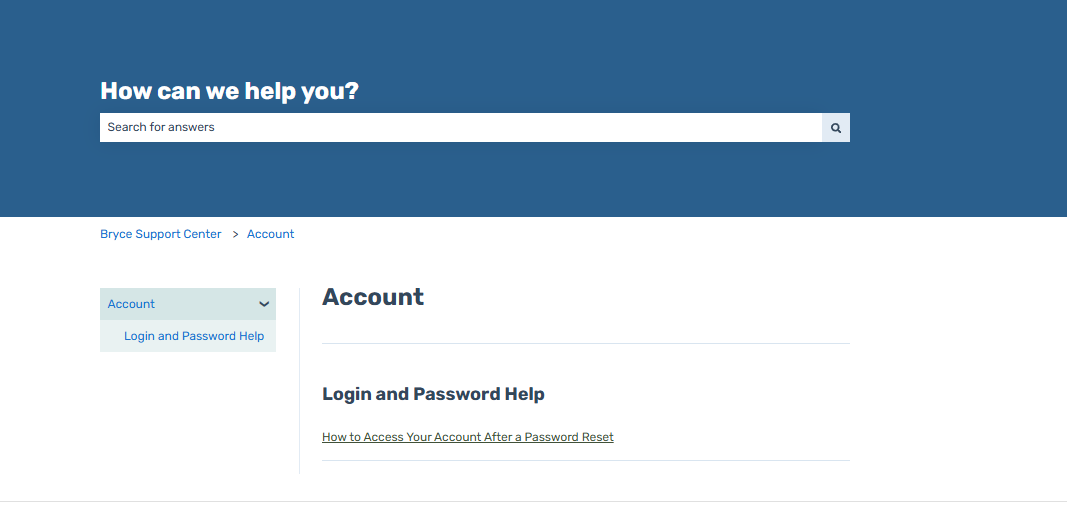
Published knowledge base article showing account access instructions
Published Knowledge Base Article
Knowledge base article header and content structure
Article Editor and Content Structure
Knowledge base search, category, and article editor experience
Search and Category Experience

Support content created

Article

Customer-facing instructions for resolving a recurring account-access issue

Structure

Clear headings, ordered steps, troubleshooting guidance, and escalation information

Discovery

Relevant category placement and searchable wording designed around customer terminology

Project outcome

DocumentationStandardized

A repeatable article structure supports consistent customer-facing guidance.

FindabilityImproved

Clear naming and categorization make the resource easier for customers to locate.

Self-serviceEnabled

Customers receive a reusable resource for resolving common account-access problems independently.

Portfolio note: This is a simulated HubSpot sandbox project created to demonstrate knowledge management, technical writing, self-service support, and content-governance skills.
Back to projects
HubSpot Service Hub

SLA + Support Dashboard Project

Priority-based queues, escalation logic, and support performance reporting designed to improve response visibility and operational control.

Priority QueueHigh-priority and overdue work surfaced
SLA TrackingResponse and resolution timing monitored
Support VisibilityDashboard views for trends and performance

Goal and support scenario

Create a support-operations system that helps teams prioritize urgent work, identify overdue tickets, monitor response and resolution performance, and review recurring issue trends from a centralized dashboard.

Queue modelPriority-based
Timing modelSLA-driven
EscalationRule-based
ReportingDashboard view

Support operations workflow

  1. 1
    Prioritize incoming tickets

    Use ticket priority, status, create date, and ownership to identify urgent work and organize the support queue.

  2. 2
    Track SLA performance

    Monitor first-response timing, resolution timing, overdue status, and other support properties that indicate service performance.

  3. 3
    Escalate overdue work

    Use escalation properties and queue views to surface tickets that require faster follow-up or management attention.

  4. 4
    Review support trends

    Use dashboard views to monitor response time, resolution time, overdue tickets, workload, and recurring issue categories.

SLA model and governance

  • Priority rules: High-priority tickets receive faster response expectations and greater queue visibility
  • SLA properties: First response time, resolution time, overdue status, priority, owner, and ticket status
  • Escalation logic: Overdue or high-priority tickets are surfaced for follow-up and management review
  • Reporting standards: Dashboard views use consistent definitions for response, resolution, overdue work, and issue trends

Tools demonstrated

HubSpot TicketsTicket PipelinesSLA PropertiesPriority QueuesEscalation LogicSupport Dashboards

Support system screenshots

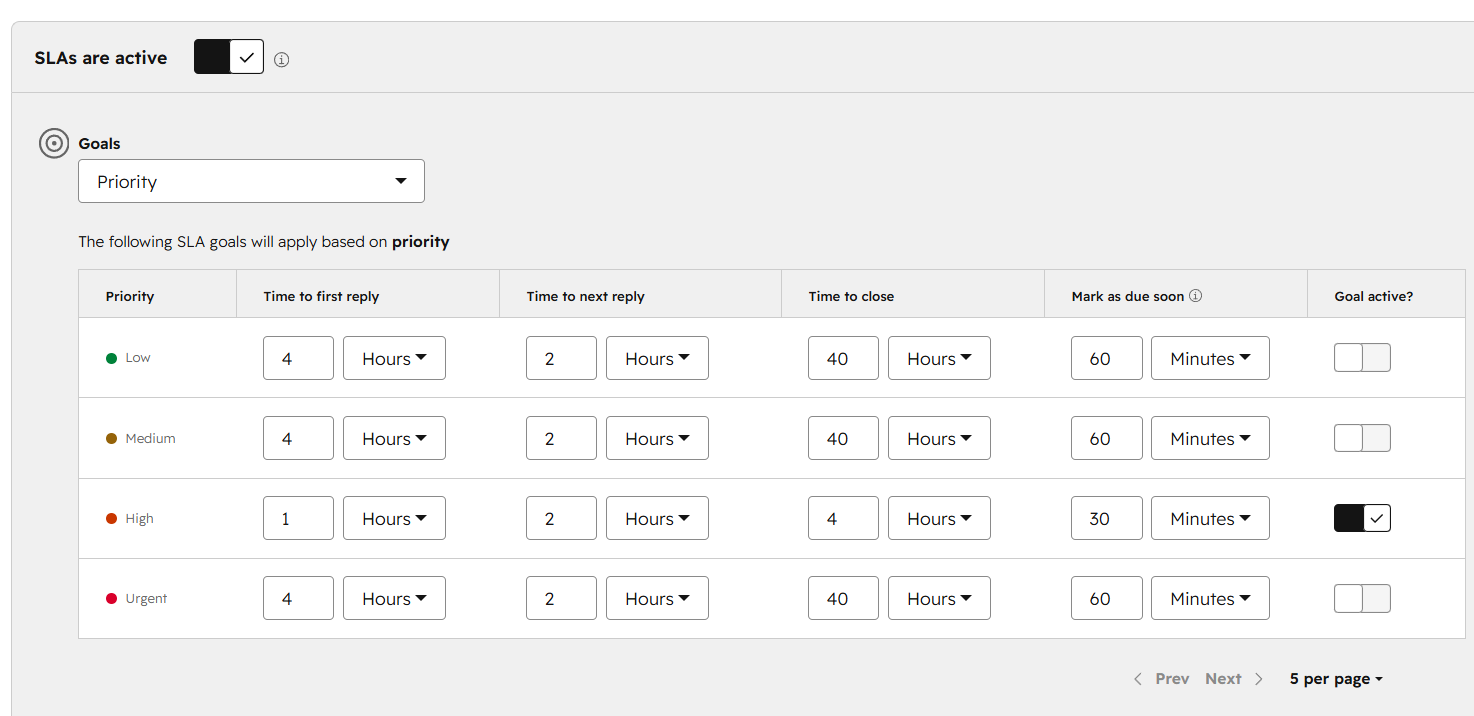
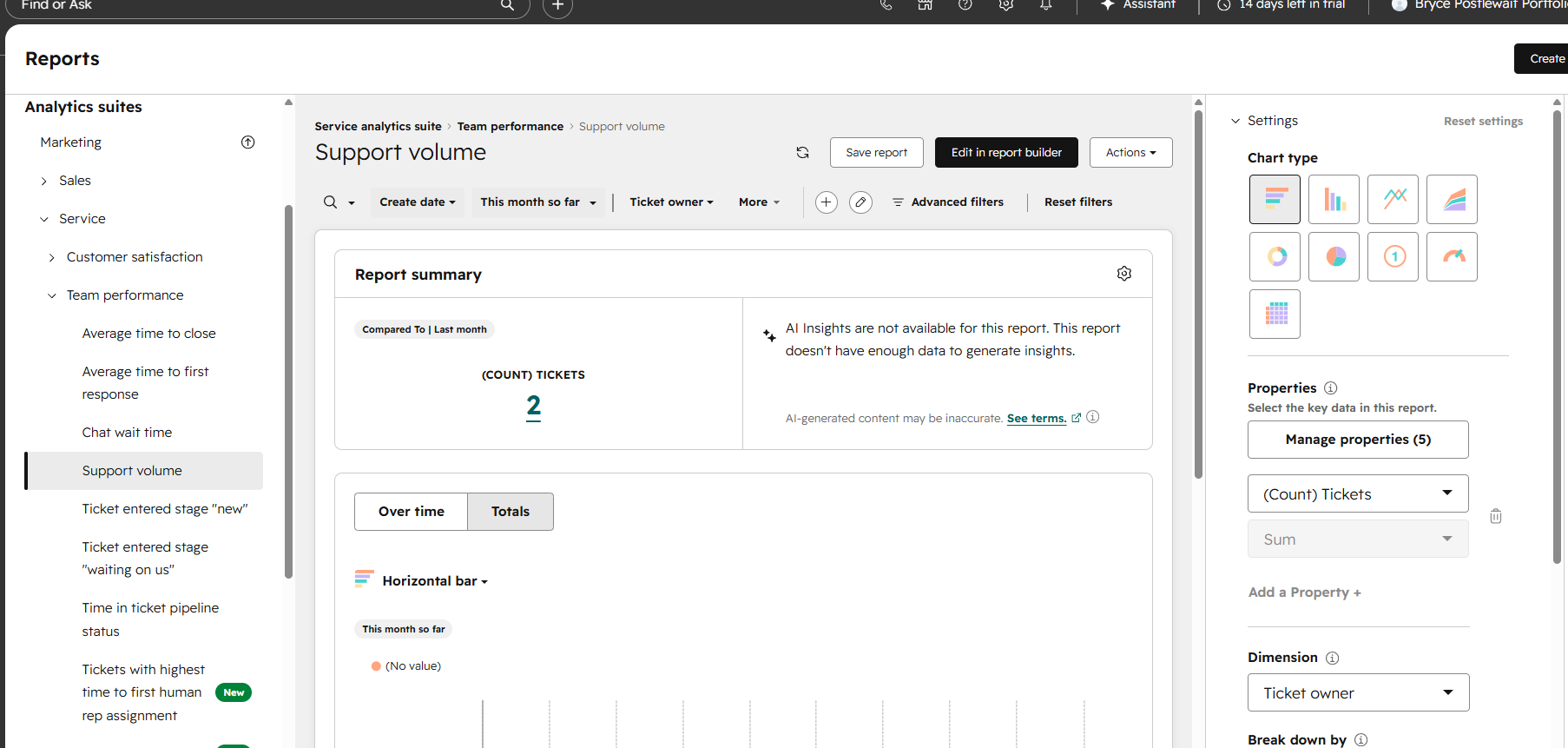
The three screenshots show the priority-based ticket queue, SLA and escalation configuration, and support-performance dashboard.
Priority-based ticket queue placeholder
Priority-Based Ticket Queue
SLA and escalation configuration placeholder
SLA and Escalation Configuration
Support performance dashboard placeholder
Support Performance Dashboard

Support reporting created

Queue

Priority, ownership, ticket status, age, and overdue work organized for faster triage

SLA

First-response timing, resolution timing, overdue status, and escalation indicators

Dashboard

Response time, resolution time, overdue tickets, issue trends, and support workload visibility

Project outcome

Queue visibilityImproved

Priority and overdue work are easier for support teams to identify and manage.

SLA monitoringOperational

Response and resolution timing can be reviewed through consistent ticket properties.

Performance reportingCentralized

Support leaders receive a clearer view of workload, overdue tickets, and recurring issue trends.

Portfolio note: This is a simulated HubSpot sandbox project created to demonstrate SLA management, support prioritization, escalation logic, and dashboard reporting skills.
```

Certifications

About

Career shift into CRM administration and RevOps support. HubSpot and Salesforce certified, building portfolio projects focused on lifecycle hygiene, automation friendly processes, and reporting dashboards. Looking for an entry level role supporting clean data, documentation, and reliable pipeline reporting.

Built for hiring managers: clean CRM data, documented processes, and dependable reporting.

Verified credentials for CRM ops, reporting, automation, and enablement.

7 credentials Verified ✓
HubSpot

HubSpot Email Marketing Certification

Email campaigns, segmentation, automation, and performance tracking

Issued Mar 2025
Credential Link Below
Email Marketing Segmentation Automation
Salesforce

Salesforce Trailhead Trailblazer

73 badges earned across Salesforce, CRM, reporting, and platform skills

IssuedCurrent
CredentialTrailhead profile available
TrailheadSalesforceCRM skills
Google

Google Analytics Certification

Attribution, tracking, performance analysis

Issued Dec 2023
Credential
Attribution Tracking KPIs
HubSpot

HubSpot SEO II Certified

Advanced SEO strategy, optimization, and website performance improvement

IssuedApr 2025
CredentialAvailable on request
SEO strategyOptimizationWebsite SEO
HubSpot

Digital Advertising Certified

Digital ad strategy, campaign planning, targeting, and performance measurement

IssuedApr 2025
CredentialAvailable on request
Ad strategyTargetingCampaigns
HubSpot

HubSpot Service Hub Software Certified

Help desk, ticketing, knowledge base, customer feedback, SLAs, and service reporting

IssuedJun 2026
CredentialLink Below
Help DeskTicketingCustomer Service
CompTIA

CompTIA Tech+

Core tech literacy, troubleshooting, and digital workflows

Issued 2024
Credential Link Below
Support Technical Support Digital Tools
View all projects
Gateway Gamers Campaign
i